scratch-gui
Project state machine
Much of the editor depends on where the current project is in its lifecycle: fetching, loading into the VM, showing, or saving. src/reducers/project-state.js models that lifecycle as a finite state machine so the current phase is always explicit.
Loading states
LoadingState in src/reducers/project-state.js lists every state, for example:
NOT_LOADED, the default stateERRORFETCHING_WITH_IDLOADING_VM_WITH_IDREMIXINGSHOWING_WITH_IDSHOWING_WITHOUT_ID
Transitions
Transitions are the Redux actions that move the project from one state to another, for example:
START_FETCHING_NEWDONE_FETCHING_WITH_IDDONE_LOADING_VM_WITH_IDSET_PROJECT_IDSTART_AUTO_UPDATING
The diagram shows how transitions connect the loading states. It leaves out error handling for clarity.

Example
When the editor opens a project by id, such as /editor#123456:
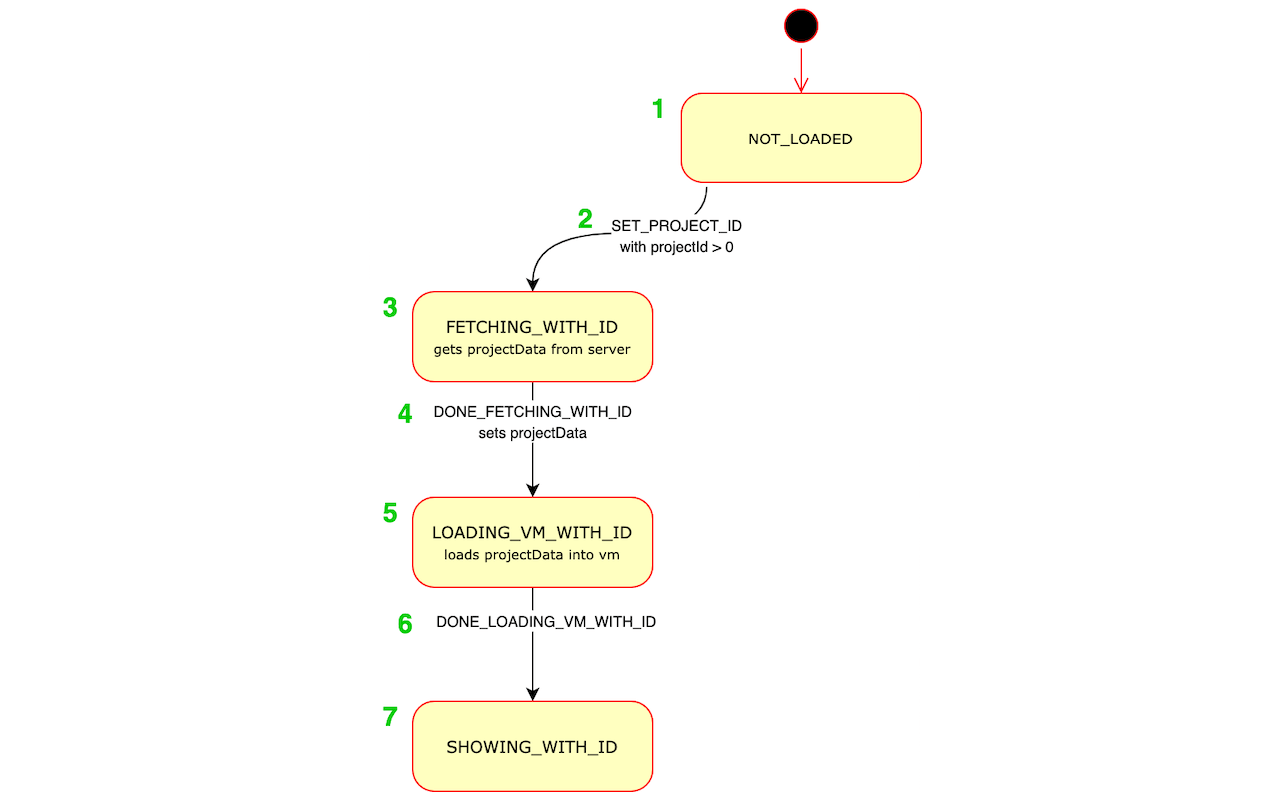
- The app mounts and the state is
NOT_LOADED. src/lib/components/project-fetcher-hoc.jsxdispatchesSET_PROJECT_IDwithprojectIdset to123456. The state becomesFETCHING_WITH_ID.- While in
FETCHING_WITH_ID, the fetcher requests the project data. - When the data arrives, the fetcher dispatches
DONE_FETCHING_WITH_IDwithprojectData. The state becomesLOADING_VM_WITH_ID. - While in
LOADING_VM_WITH_ID,src/lib/components/vm-manager-hoc.jsxloadsprojectDatainto the VM. - When loading finishes, the VM manager dispatches
DONE_LOADING_VM_WITH_ID. The state becomesSHOWING_WITH_ID. - In
SHOWING_WITH_IDthe project is playable and editable.